


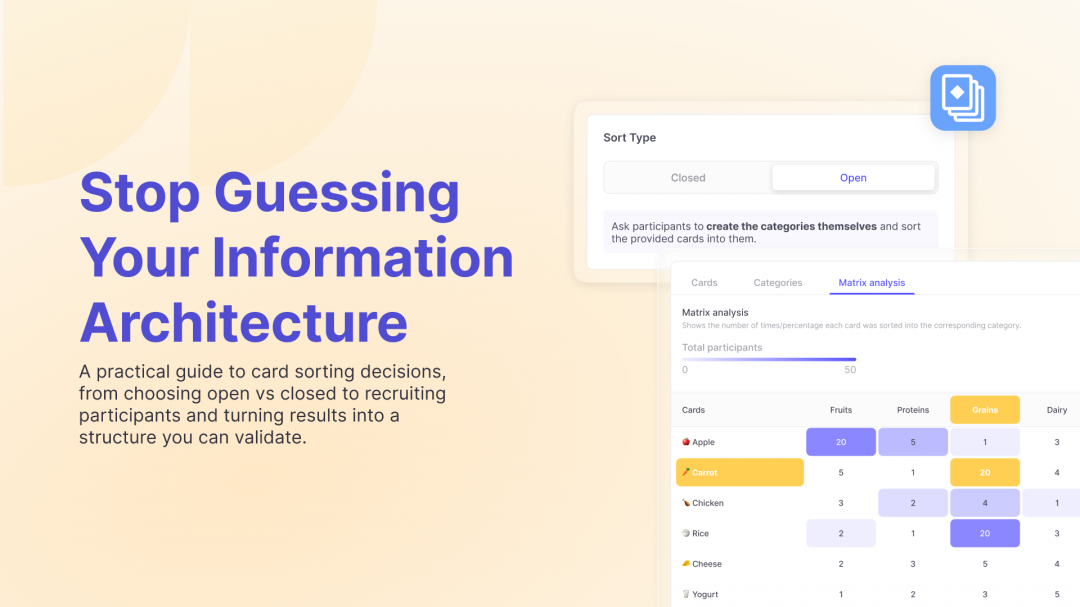
Card sorting is one of those research methods in user testing that people mention a lot, but teams often reach for it only after a navigation debate gets stuck. Someone says “we should card sort this,” and what they really mean is: we have a structure that makes sense internally, but we are not sure it makes sense to users.
That’s the sweet spot for card sorting. It gives you evidence about how people group content, what labels feel natural, and where your current categories create friction. It’s also one of the fastest ways to get clarity when you are redesigning a website, restructuring a help center, cleaning up a product menu, or expanding a feature set.
At Useberry, we see teams use card sorting as a way to replace guesswork with something concrete. Not because they want to become information architecture experts overnight, but because they want to make a specific decision with less uncertainty.
When is card sorting the right move?
If your problem sounds like “users can’t find things,” card sorting is usually a strong candidate.
It helps when you are building or revisiting your information architecture, especially when you have lots of content and multiple teams have contributed to it over time. It’s also useful when labels start drifting, for example when marketing calls something one thing, product calls it another, and support calls it something else. Card sorting brings you back to how users see the world.
A simple way to decide is to ask: are we trying to understand how people group and name information, or are we trying to test if they can navigate an existing structure? Card sorting answers the first. Tree testing answers the second. If you are still shaping the structure, start with card sorting. If you already have a draft menu or hierarchy you want to validate, tree testing is often the next step.
Open vs closed card sorting: which one should you run?
The choice doesn’t need to be complicated.
Open card sorting is a great fit when you want to discover how users naturally group things and what words they use for those groups. You give people cards, they create their own categories, and you learn their mental model. This is most useful early in an IA project, when you want ideas you would not get from internal brainstorming alone.
Closed card sorting is useful when you already have categories in mind and want to see if users agree with them. Participants sort the cards into your predefined groups. This works well when you are refining an existing navigation or validating a proposed structure before implementation.
If you want a quick starting point inside Useberry, you don’t have to build everything from scratch. You can begin with ready-made templates like the Open Card Sorting Template and Closed Card Sorting Template and then adjust them to match your content and goals. That’s often the difference between “we’ll do this someday” and “we can launch it today.”
How do you recruit participants quickly for a card sorting study?
This is one of the real blockers for teams. The method is simple, but recruiting can feel like the slow part. In practice, you have two reliable paths:
If you want speed and targeting, you can recruit using a participant panel. With Useberry, teams can use the Participant Pool to get responses without spending days coordinating schedules. This is helpful when you need a quick directional answer, or when you want to test with a niche audience and you don’t have easy access to those users in your own network.
If you want to hear from your actual customers, self-recruitment is usually the best option. Card sorting works especially well with a shareable study link, because participants can complete it asynchronously. You send it to your email list, customer community, internal users, or beta group and see how they sort the labels.
The key is to make participation easy. Clear instructions, realistic study length, and cards that are written in plain language will give you stronger data regardless of how you recruit.

How do you write good cards so your results don’t turn messy?
Card sorting results become confusing when the cards are confusing.
A strong card set is consistent in detail and written in the language users would actually understand. If one card says “Billing” and another says “Change credit card details and download invoices,” participants are not sorting the same type of thing. They are sorting a mix of broad categories and specific tasks, which creates noise.
Try to keep cards at a similar level. If your cards represent pages, keep them as pages. If they represent concepts, keep them as concepts. Also, avoid internal naming. Card sorting is often the moment where you discover that your internal wording does not match the way users talk about the same thing.
This is another place where Useberry’s Research Templates help. A template doesn’t pick your cards for you, but it gives you a reliable structure from the start so you can focus on the content and not worry about building the study flow from scratch every time.
How do you analyze card sorting results without overthinking it?
This is the part where teams often get stuck. They expect one perfect answer, but card sorting usually gives you patterns, not a single “correct” menu. A practical approach is to look for three things:
- First, which cards are consistently grouped together. These are your strongest signals and often become natural categories or subcategories.
- Second, which cards are split across many different categories. These are usually ambiguous, misunderstood, or simply too broad. They often need clearer labels, different positioning, or follow-up testing.
- Third, what language people use for categories. Even if you don’t adopt the exact names, you can learn what words feel intuitive and what words sound internal.
If you run your study in Useberry, the results experience makes this easier to see without living in spreadsheets. The results screen includes tabs like Cards and Categories so you can review how each card was placed and what category names participants created. You can quickly spot agreement and disagreement, and you can standardize similar categories when participants used slightly different wording for the same idea. The Standardization Grid summarizes placements across your standardized categories, and the Similarity Matrix helps you see which cards were frequently grouped together. That makes it easier to move from raw results to a small number of strong IA directions.
What should you do after a card sort?
Card sorting is how you build your foundation. Once you identify the patterns, you can turn them into a draft information architecture. That draft can be messy at first. You can refine labels, combine overlapping groups, and decide what belongs at the top level versus what should live deeper in the structure.
After that, it is time to validate the draft. This is where tree testing becomes the natural follow-up because it tells you whether people can actually navigate your proposed hierarchy to find information. Card sorting helps you build a structure that fits mental models. Tree testing helps you confirm it works as a navigation system.
If you want to stay in the same workflow, this is where Useberry shines as an IA toolkit. You can run card sorting to shape the structure, then validate with tree testing, and support those results with quick follow-up questions using surveys or by setting up an usability test. It’s a clean way to go from “we think this makes sense” to “users can find what they need.”
A final note from the marketing side
Card sorting is one of the most practical ways to reduce internal debate around navigation. It gives you something rare in cross-functional teams: shared evidence. When you have results showing how users group content and what labels they expect, conversations get simpler. People stop arguing about what feels right and start aligning around what users actually expect.
If you’d like a useful companion piece, Harry’s article on open and closed card sorting explains the two approaches clearly and shows how the Useberry results interface supports analysis.
Feel free to contact us!
We’d love to know your experience with Useberry and we will be excited to hear your thoughts and ideas.